
Effortless MIPS Setup in AdvancedMD: A Step-by-Step Guide
The Merit-based Incentive Payment System (MIPS) is a key part of the U.S. healthcare reimbursement system, introduced as part of the Medicare Access and CHIP Reauthorization Act (MACRA). For healthcare providers, getting MIPS setup is vital but can often seem challenging and daunting. With the right tools the process becomes manageable and efficient. One such tool is the AdvancedMD system, which is designed to simplify the MIPS reporting and submission process.
If you are looking to set up MIPS in AdvancedMD, you’re in luck! Not only does the system have several features that make the process more straightforward, but this post will guide you through the essential steps to get MIPS up and running in AdvancedMD, highlighting why it’s a user-friendly experience.

What is MIPS and Why is It Important?
The Merit-based Incentive Payment System (MIPS) is a Medicare program that rewards healthcare providers for high-quality, efficient care. It combines previous programs like PQRS and the Medicare EHR Incentive Program into a single performance-based system.
Why Participate in MIPS?
- Financial Impact – High scores earn Medicare bonuses, while low scores can lead to reimbursement cuts of up to 9%.
- Quality & Compliance – MIPS promotes better patient care and ensures providers meet CMS regulations.
- Reputation & Growth – High-performing providers appear on Medicare Compare, attracting more patients.
- Data-Driven Insights – MIPS reporting helps optimize clinical and operational decisions.
Participating in MIPS ensures better reimbursements, compliance, and improved patient outcomes.
1.Seamless Integration with AdvancedMD
AdvancedMD is a cloud-based healthcare software. One of its standout features is how seamlessly it integrates MIPS reporting into its platform. AdvancedMD enables providers to easily track required MIPS quality measures directly within the system.
2. Pre-Built MIPS Reporting Templates
One of the challenges of MIPS setup is selecting and tracking the appropriate quality measures. Fortunately, AdvancedMD offers pre-built MIPS reporting templates tailored to the needs of different specialties. Utilizing their template library, you can easily find the MIPS measures your practice qualifies for, import them into your office key, and set them up for use in your notes. Even better, these templates are updated yearly to stay current with each years specific MIPS requirements. By automatically pulling data from the system, the software makes it easy to submit accurate and timely reports to Medicare.
Here at Aspire, we specialize in building MIPS into your clinic’s templates. When MIPS was first introduced in 2017 we tackled it head on. In doing so, we were ahead of the game and have received a full merit increase since then. We have done this by learning and understanding the most effective way to utilize the templates that AdvancedMD has built and streamline the process.
3. Automated Data Capture
AdvancedMD makes data capture effortless. The system automatically gathers patient data from your EHR system and uses that information to populate MIPS performance measures. For example, if a patient has a particular condition or meets a clinical criteria, such as an A1c > 9% and a diagnosis of diabetes, AdvancedMD will automatically identify and track that data in real time. This reduces the time your staff spends manually gathering and verifying patient information, allowing them to focus on patient care instead of paperwork.
4. Customizable Reporting Options
Although AdvancedMD provides standard reporting templates, the system also offers customization options. This flexibility allows you to modify and adapt the reports to your practice’s specific needs. Whether you need to report on specific quality measures or adjust performance thresholds, AdvancedMD gives you the tools to tailor your reports for optimal performance under MIPS.
5. Real-Time Feedback and Performance Tracking
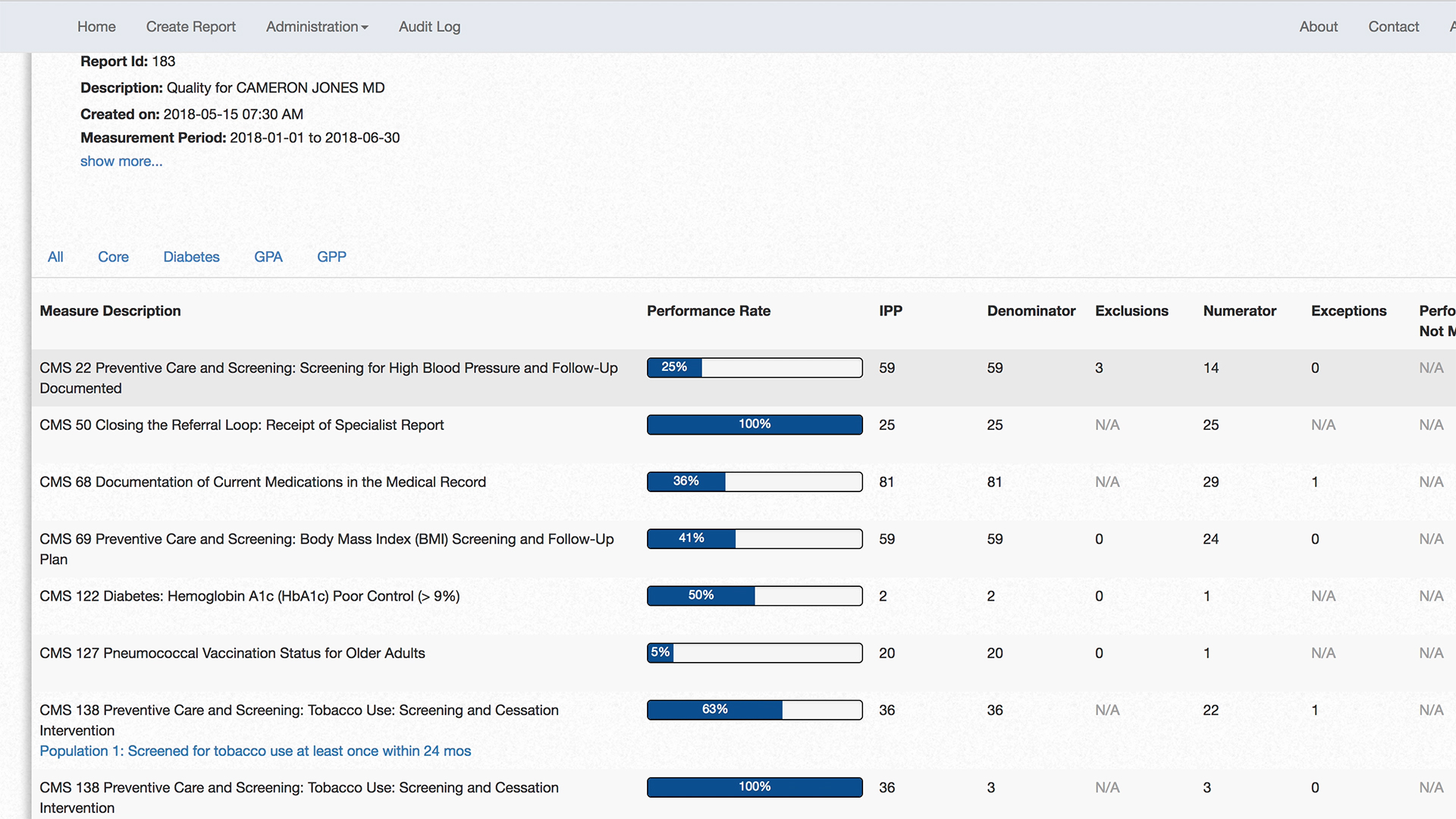
A key advantage of using AdvancedMD for MIPS is its ability to offer real-time performance tracking. The system continuously updates your MIPS progress, allowing you to track your performance across all the categories in the MIPS program. This helps ensure that you’re meeting the necessary benchmarks and gives you an opportunity to adjust your strategy if needed. Plus, real-time feedback helps your practice avoid surprises when the time comes to submit data to CMS.
6. Easy Submission to CMS
AdvancedMD simplifies the submission process to CMS (Centers for Medicare & Medicaid Services). Once your MIPS data is ready, the system enables you to submit directly to CMS without leaving the platform. This streamlined submission process ensures that your data is accurately reported and that you’re compliant with CMS regulations. Plus, AdvancedMD handles the submission deadlines, so you don’t have to worry about missing critical dates.
7. Continuous Updates to Stay CMS Compliant
The world of healthcare reporting is always changing, and MIPS is no exception. Luckily, AdvancedMD stays up-to-date with the latest CMS requirements and updates its software to reflect any changes in MIPS guidelines. This means that your practice can continue to rely on the system year after year, knowing that it is always compliant with the latest regulations.
Conclusion
Setting up MIPS in the AdvancedMD system is an easy and efficient process. With integrated reporting tools, automated data capture, and customizable features, AdvancedMD streamlines the entire MIPS reporting and submission process. Whether you are just starting with MIPS or are an experienced participant, AdvancedMD makes it simple to meet the requirements and succeed in the program.
With its user-friendly interface, expert support, and real-time performance tracking, AdvancedMD helps you stay on top of MIPS without the stress. If you haven’t yet explored the MIPS setup in AdvancedMD, now is the perfect time to take advantage of these time-saving features and we here at Aspire would love to help you along that path.
Looking for expert guidance on setting up MIPS for your healthcare practice? Contact us today for a free consultation tailored to your needs.